

Learn how to select the best PECPool Bitcoin stratum server, test regional servers and ports, configure reliable backup pools, reduce rejected shares, and improve mining stability.
Selecting the correct stratum server is an important part of configuring a Bitcoin ASIC miner. The best server is not always the one that appears geographically closest. Internet routing, packet loss, local filtering, ISP quality, network congestion, and port accessibility can all affect the connection between your miner and the mining pool.
A properly selected PECPool stratum server can provide:
This guide explains how to select, test, and prioritize PECPool Bitcoin stratum servers for Antminer, WhatsMiner, and other compatible SHA-256 ASIC miners.
A stratum server is the connection point between your ASIC miner and the mining pool. Through this connection, PECPool sends mining jobs to your miner and receives the shares calculated by the device.
A complete stratum address contains three main parts:
Example:
stratum+tcp://btc-eu.pecpool.com:3333In this example:
stratum+tcp:// is the connection protocol.btc-eu.pecpool.com is the server hostname.3333 is the port number.
Do not enter a normal website address such as cp.pecpool.com in the miner's
Pool URL field. ASIC miners require a stratum address rather than a normal web page address.
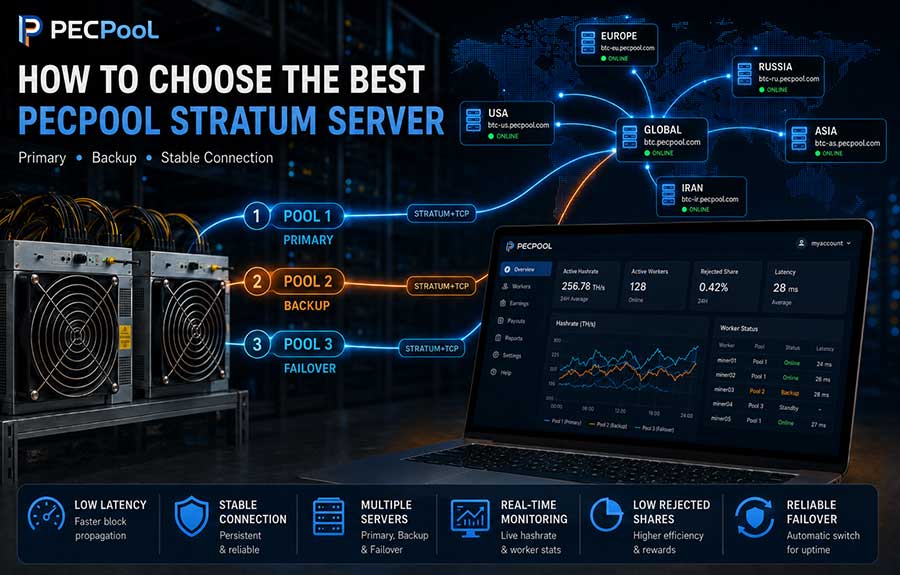
PECPool provides several regional Bitcoin stratum servers. Miners can select the most suitable connection according to their location and actual network conditions.
| Region | Server | Available Ports |
|---|---|---|
| Global | btc.pecpool.com |
3333, 443, 25 |
| United States | btc-us.pecpool.com |
3333, 443, 25 |
| Europe | btc-eu.pecpool.com |
3333, 443, 25 |
| Russia | btc-ru.pecpool.com |
3333, 443, 25 |
| Asia | btc-as.pecpool.com |
8443, 443, 25 |
| Iran | btc-ir.pecpool.com |
8443, 443, 25 |
| Iran Alternative | btc.pecpool.cc |
8443, 443, 25 |
Always enter the official hostname exactly as shown. Do not replace the hostname with a fixed IP address unless PECPool Support specifically instructs you to do so.
Server IP addresses may change because of infrastructure maintenance, load balancing, routing improvements, or service migrations. Using the official hostname allows the miner to resolve the correct destination automatically.
The server region identifies the general infrastructure location or routing destination. The port identifies the network entry point used by the miner to connect to that server.
For example, the following addresses use the same Europe server but different ports:
stratum+tcp://btc-eu.pecpool.com:3333
stratum+tcp://btc-eu.pecpool.com:443
stratum+tcp://btc-eu.pecpool.com:25
If one port is blocked by a router, firewall, ISP, or local network policy, another supported port on the same regional server may still work.
Port 3333 is a commonly used Bitcoin stratum port. It is available on the PECPool Global, United States, Europe, and Russia servers.
Example:
stratum+tcp://btc-eu.pecpool.com:3333This port is normally a suitable first choice when the network allows standard mining traffic.
Port 8443 is available on the PECPool Asia, Iran, and Iran Alternative connections.
stratum+tcp://btc-as.pecpool.com:8443
stratum+tcp://btc-ir.pecpool.com:8443
stratum+tcp://btc.pecpool.cc:8443
Port 443 is provided as an alternative stratum port. It can be useful when another port cannot be reached from the miner's network.
stratum+tcp://btc-as.pecpool.com:443
Using port 443 does not automatically mean that the mining connection uses HTTPS or encryption.
The connection protocol shown in the Pool URL remains stratum+tcp://.
Port 25 is another alternative PECPool stratum port.
stratum+tcp://btc-eu.pecpool.com:25Although port 25 is commonly associated with email services, PECPool also provides it as an alternative mining connection port on its official stratum servers.
Some internet providers or firewalls may restrict this port. It should therefore be tested rather than assumed to work.
Start with the server closest to the physical location of your mining operation, but do not make the final decision based only on geographical distance.
A nearby server may still perform poorly when:
A more distant server with a stable route can perform better than a nearby server with frequent packet loss or disconnections.
The recommended selection process is:
The following configurations are recommended starting points. Actual performance depends on the miner's ISP, routing, firewall, and local network conditions.
Pool 1: stratum+tcp://btc-us.pecpool.com:3333
Pool 2: stratum+tcp://btc.pecpool.com:443
Pool 3: stratum+tcp://btc-eu.pecpool.com:25Pool 1: stratum+tcp://btc-eu.pecpool.com:3333
Pool 2: stratum+tcp://btc.pecpool.com:443
Pool 3: stratum+tcp://btc-us.pecpool.com:25Pool 1: stratum+tcp://btc-ru.pecpool.com:3333
Pool 2: stratum+tcp://btc-eu.pecpool.com:443
Pool 3: stratum+tcp://btc.pecpool.com:25Pool 1: stratum+tcp://btc-as.pecpool.com:8443
Pool 2: stratum+tcp://btc.pecpool.com:443
Pool 3: stratum+tcp://btc-eu.pecpool.com:25For mining networks affected by regional or international connectivity interruptions, the following diversified configuration can be used:
Pool 1: stratum+tcp://btc.pecpool.cc:8443
Pool 2: stratum+tcp://btc-as.pecpool.com:443
Pool 3: stratum+tcp://btc-eu.pecpool.com:3333This configuration uses different hostnames, regions, and ports to provide greater connection diversity.
Begin with the Global server and add the nearest regional connections as backups:
Pool 1: stratum+tcp://btc.pecpool.com:3333
Pool 2: Nearest regional PECPool server on port 443
Pool 3: Another regional PECPool server on a supported portAfter testing, move the most stable server to Pool 1.
Most ASIC miners provide three pool configuration fields:
If Pool 1 becomes temporarily unreachable, the miner can automatically try Pool 2 and then Pool 3. This can reduce downtime during:
A strong configuration should preferably use different hostnames, regions, and ports.
For example, the following configuration uses only one regional hostname:
Pool 1: stratum+tcp://btc-eu.pecpool.com:3333
Pool 2: stratum+tcp://btc-eu.pecpool.com:443
Pool 3: stratum+tcp://btc-eu.pecpool.com:25This can protect against a blocked port, but it does not provide the same routing diversity as using multiple regional hostnames.
A more diversified configuration is:
Pool 1: stratum+tcp://btc-eu.pecpool.com:3333
Pool 2: stratum+tcp://btc.pecpool.com:443
Pool 3: stratum+tcp://btc-us.pecpool.com:25The most useful test is an actual mining connection. However, preliminary network tests can help determine whether the hostname and port are reachable.
Tests should be performed from a computer connected to the same router, gateway, or internet connection used by the mining devices.
DNS converts a hostname such as btc-eu.pecpool.com into an IP address.
Windows PowerShell:
Resolve-DnsName btc-eu.pecpool.comWindows Command Prompt:
nslookup btc-eu.pecpool.comLinux:
getent hosts btc-eu.pecpool.comAnother Linux option is:
nslookup btc-eu.pecpool.comA successful result should normally return at least one IP address.
If DNS resolution fails:
Do not permanently replace the official hostname with the returned IP address.
A hostname may resolve correctly while the selected stratum port is blocked.
Windows PowerShell:
Test-NetConnection btc-eu.pecpool.com -Port 3333Testing port 443:
Test-NetConnection btc-eu.pecpool.com -Port 443Look for the following result:
TcpTestSucceeded : TrueLinux using Netcat:
nc -vz btc-eu.pecpool.com 3333Testing port 443:
nc -vz btc-eu.pecpool.com 443A successful TCP test confirms that the tested hostname and port can be reached from that network.
However, it does not confirm that:
These items must be verified from the ASIC miner and the PECPool panel.
Windows:
ping btc-eu.pecpool.comLinux:
ping -c 10 btc-eu.pecpool.comPing can provide basic information about:
Ping should not be used as the only test. A server or firewall may ignore Ping requests while the stratum port remains fully operational.
Lower latency is generally helpful because submitted shares can reach the pool sooner. However, latency alone does not determine the best server.
Example Server A:
Average latency: 45 ms
Packet loss: 4%
Frequent disconnections: Yes
Example Server B:
Average latency: 85 ms
Packet loss: 0%
Frequent disconnections: No
Server B may provide better mining performance because its route is more stable, even though its latency is higher.
Use the following priority order when comparing servers:
Do not select a server only because it produced the lowest single Ping result.
Enter the selected PECPool servers in the miner's pool configuration.
URL: stratum+tcp://btc-eu.pecpool.com:3333
Worker: myaccount.miner01
Password: xURL: stratum+tcp://btc.pecpool.com:443
Worker: myaccount.miner01
Password: xURL: stratum+tcp://btc-us.pecpool.com:25
Worker: myaccount.miner01
Password: xUse the same mining account and worker name in all three pool entries.
The recommended worker format is:
AccountName.WorkerNameExample:
myaccount.miner01The Pool Password field is not your PECPool login password. When no special pool password is required, use:
xNever enter any of the following in the pool password field:
After saving the pool configuration, open the miner's status page and check:
A successful connection should normally show:
The exact status names depend on the miner manufacturer and firmware.
After the miner begins submitting valid shares:
A newly connected or restarted worker may require approximately 10 to 20 minutes to appear or change to Online status.
Do not consider a server reliable only because the worker remains Online for a few minutes. Observe the connection long enough to detect:
Observe the server for at least 30 to 60 minutes and confirm that:
Observe the connection for several hours or a complete operating day to evaluate:
Avoid changing servers repeatedly after only a few minutes. Frequent changes make accurate performance comparison difficult.
A suitable Pool 1 address should:
The primary server does not need to have the absolute lowest Ping result. Long-term stability is more important than a small latency difference.
Pool 2 and Pool 3 should remain usable when the primary server or network route has a problem.
Good backup addresses should preferably use:
Example:
Pool 1: Europe on port 3333
Pool 2: Global on port 443
Pool 3: United States on port 25
Periodically test the backup addresses. A configuration that worked several months ago may no longer be the best option for the current ISP or network route.
Try the following:
Possible causes include:
Run a TCP port test and review the miner's connection log.
This can occur when Ping responses are disabled while the TCP stratum port remains available.
If:
the failed Ping result alone is not a reason to change the server.
Try another supported port for the selected region:
443or:
25If none of the ports work, test another official PECPool regional hostname.
This normally indicates that the network path, router, ISP, or firewall treats the ports differently.
You can continue using the working official port when:
Do not assume the connection is encrypted only because port 443 is being used.
This may indicate that Pool 1 is unstable or temporarily unreachable.
Check:
If Pool 2 consistently performs better, move that address to Pool 1 after completing sufficient testing.
Check:
Also confirm that the address begins with:
stratum+tcp://A low pool hashrate does not always indicate a stratum server problem.
Check:
Pool hashrate is calculated from valid shares received over time and may temporarily differ from the miner's local real-time value.
Possible causes include:
Return to the previous stable server or test another official PECPool region. Compare performance over a reasonable period rather than using only a small number of shares.
cp.pecpool.com as a stratum server.stratum+tcp:// format is used.The best PECPool stratum server is the server that provides the most reliable mining connection from the actual location of your mining devices.
Evaluate each server using:
Configure three official PECPool addresses, use different regions and ports where practical, and periodically review their performance.
A stable server with slightly higher latency is normally a better choice than a low-latency server that frequently disconnects or loses shares.
Copyright ©2026 PECPool.